Cloud computing is on-demand access to computing resources: physical or virtual servers, data storage, networking capabilities, application development tools, software, AI-powered analytic platforms and more—over the internet with pay-per-use pricing.
Cloud Computing is a technology that allows you to store and access data and applications over the internet instead of using your computer’s hard drive or a local server.
In cloud computing, you can store different types of data such as files, images, videos, and documents on remote servers, and access them anytime from any device connected to the internet.
Infrastructure: Cloud computing depends on remote network servers hosted on the Internet to store, manage, and process data.
On-Demand Access: Users can access cloud services and resources on demand, scaling up or down without having to invest in physical hardware.
Types of Services: Cloud computing offers various benefits such as cost saving, scalability, reliability, and accessibility. It reduces capital expenditures, and improves efficiency.
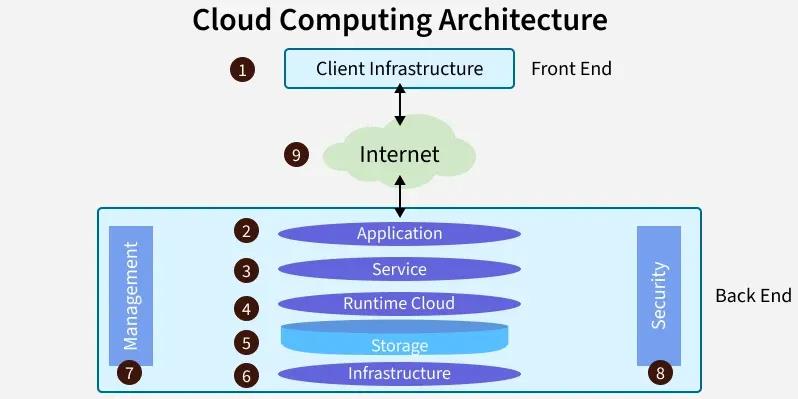
1. Front End (User Interaction Enhancement)
The User Interface of Cloud Computing consists of 2 sections of clients. The Thin clients are the ones that use web browsers facilitating portable and lightweight accessibility and others are known as Fat Clients that use many functionalities for offering a strong user experience.
2. Back-end Platforms (Cloud Computing Engine)
The core of cloud computing is made at back-end platforms with several servers for storage and processing computing. Management of Applications logic is managed through servers, and effective data handling is provided by storage. The combination of these platforms at the backend offers processing power, and capacity to manage and store data behind the cloud.
3. Cloud-Based Delivery and Network
On-demand access to the computer and resources is provided over the Internet, Intranet, and Intercloud. The Internet comes with global accessibility; the Intranet helps in internal communications of the services within the organization, and the Intercloud enables interoperability across various cloud services. This dynamic network connectivity ensures an essential component of cloud computing architecture on guaranteeing easy access and data transfer.
Types of Cloud Computing Services
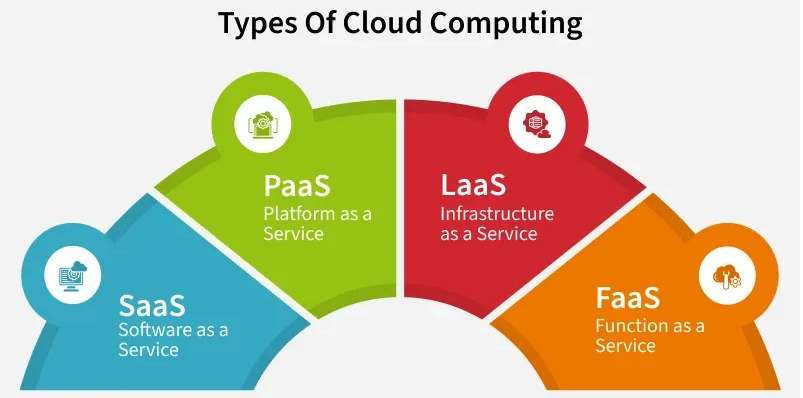
The following are the types of Cloud Computing:
Infrastructure as a Service (IaaS)
Platform as a Service (PaaS)
Software as a Service (SaaS)
Function as a Service (FaaS)
1. Infrastructure as a Service (IaaS)
Infrastructure as a Service (IaaS) is a type of cloud computing that gives people access to IT tools like virtual computers, storage, and networks through the internet. You don’t need to buy or manage physical hardware. Instead, you pay only for what you use.
Here are some key benefits of using IaaS:
Flexibility and Control: IaaS comes up with providing virtualized computing resources such as VMs, Storage, and networks facilitating users with control over the Operating system and applications.
Reducing Expenses of Hardware: IaaS provides business cost savings with the elimination of physical infrastructure investments, making it cost-effective.
Scalability of Resources: The cloud provides in scaling of hardware resources up or down as per demand facilitating optimal performance with cost efficiency.
2. Platform as a Service (PaaS)
Platform as a Service (PaaS) is a cloud computing model where a third-party provider offers the software and hardware tools needed to develop, test, and run applications. This allows users to focus on building their applications without worrying about managing servers or infrastructure.
For example, AWS Elastic Beanstalk is a PaaS offered by Amazon Web Services that helps developers quickly deploy and manage applications while AWS takes care of the needed resources like servers, load balancing, and scaling.
Here are some key benefits of using PaaS:
Simplifying the Development: Platform as a Service offers application development by keeping the underlying Infrastructure as an abstraction. It helps the developers to completely focus on application logic (Code) and background operations are completely managed by the AWS platform.
Enhancing Efficiency and Productivity: PaaS lowers the Management of Infrastructure complexity, speeding up the Execution time and bringing the updates quickly to market by streamlining the development process.
Automation of Scaling: Management of resource scaling, guaranteeing the program’s workload efficiency is ensured by PaaS.
3. Software as a Service (SaaS)
Software as a Service (SaaS) is a way of using software over the internet instead of installing it on your computer. The software is hosted by a company, and you can use it just by logging in through a web browser. You don’t need to worry about updates, maintenance, or storage, the provider takes care of all that.
A common example is Google Docs. You can write and share documents online without downloading any software.
Here are some key benefits of using SaaS:
Collaboration And Accessibility: Software as a Service (SaaS) helps users to easily access applications without having the requirement of local installations. It is fully managed by the AWS Software working as a service over the internet encouraging effortless cooperation and ease of access.
Automation of Updates: SaaS providers manage the handling of software maintenance with automatic latest updates ensuring users gain experience with the latest features and security patches.
Cost Efficiency: SaaS acts as a cost-effective solution by reducing the overhead of IT support by eliminating the need for individual software licenses.
4. Function as a Service (FaaS)
Function as a service (FaaS) is a cloud-computing service that allows customers to run code in response to events, without managing the complex infrastructure. You just write the code, upload it, and the cloud provider runs it only when it’s needed. You pay only for the time your code runs.
For example, with AWS Lambda, you can write a function that resizes images whenever someone uploads a photo to your website. You don’t need to keep a server running all the time AWS runs your function only when a photo is uploaded.
Here are some key benefits of using SaaS:
Event-Driven Execution: FaaS helps in the maintenance of servers and infrastructure, making users worry about it. FaaS facilitates the developers to run code as a response to the events.
Cost Efficiency: FaaS facilitates cost efficiency by coming up with the principle “Pay as per you Run” for the computing resources used.
Scalability and Agility: Serverless Architectures scale effortlessly in handing the workloads promoting agility in development and deployment.
Cloud Deployment Models
The following are the Cloud Deployment Models:
1. Private Cloud
It provides an enhancement in protection and customization by cloud resource utilization as per particular specified requirements. It is perfect for companies which are looking for security and compliance needs.
2. Public Cloud
It comes with offering a pay-as-you-go principle for scalability and accessibility of cloud resources for numerous users. It ensures cost-effectiveness by providing enterprise-needed services.
3. Hybrid Cloud
It comes up with a combination of elements of both private and public clouds providing seamless data and application processing between environments. It offers flexibility in optimizing resources such as sensitive data in private clouds and important scalable applications in public clouds.
Cloud Security
Cloud security recommended measures and practices designed to protect data, applications, and infrastructure in cloud computing environments. The following are some of the best practices of cloud security:
1. Data Encryption
Encryption is essential for securing data stored in the cloud. It ensures that data remains unreadable to unauthorized users even if it is intercepted.
2. Access Control
Implementing strict access controls and authentication mechanisms helps ensure that only authorized users can access sensitive data and resources in the cloud.
3. Multi-Factor Authentication (MFA)
MFA adds an extra layer of security by requiring users to provide multiple forms of verification, such as passwords, biometrics, or security tokens, before gaining access to cloud services.
Use Cases of Cloud Computing
Cloud computing provides many use cases across industries and various applications:
1. Scalable Infrastructure
Infrastructure as a Service (IaaS) enables organizations to scale computing resources based on demand without investing in physical hardware.
2. Efficient Application Development
Platform as a Service (PaaS) simplifies application development, offering tools and environments for building, deploying, and managing applications.
3. Streamlined Software Access
Software as a Service (SaaS) provides subscription-based access to software applications over the internet, reducing the need for local installation and maintenance.
4. Data Analytics
Cloud-based platforms facilitate big data analytics, allowing organizations to process and derive insights from large datasets efficiently.
5. Disaster Recovery
Cloud-based disaster recovery solutions offer cost-effective data replication and backup, ensuring quick recovery in case of system failures or disasters.